
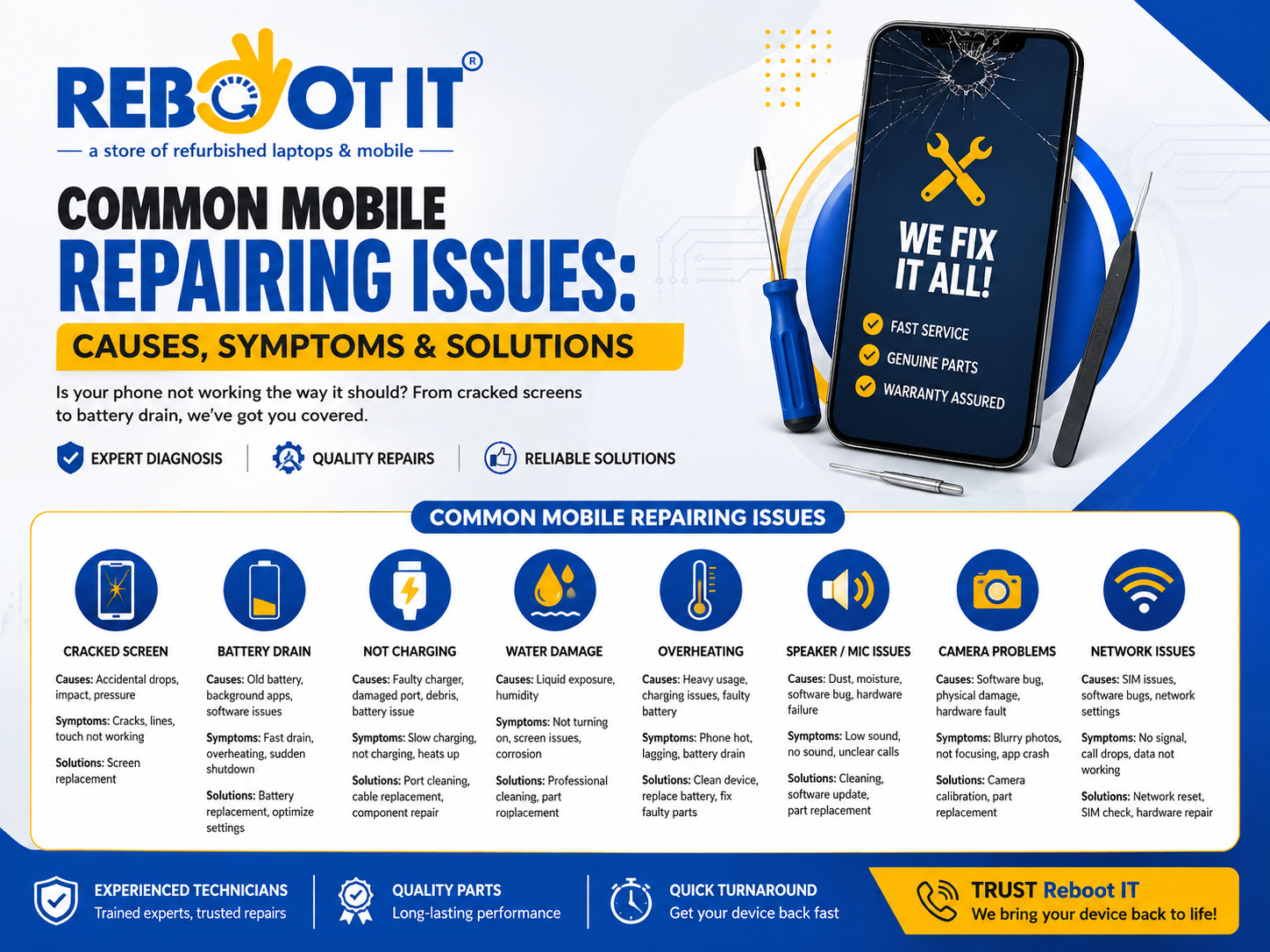
Common Mobile Repairing Issues Causes, Symptoms, Solutions
Mobile phones have become an essential part of everyday life. We use them for calls, messages, payments, work, navigation, photography, entertainment and storing important personal information. Because a phone is used so frequently, even a small fault can quickly become frustrating.
The good news is that many common mobile repairing issues can be diagnosed and repaired without replacing the entire device. Problems such as a cracked screen, fast battery drain, charging failure, overheating, water damage, software freezing and camera problems are often repairable when diagnosed correctly.
This guide explains the most common mobile phone problems, what causes them, what symptoms to look for, what you can safely try yourself and when professional mobile repair is the better option.
What Are the Most Common Mobile Repairing Issues?
The most common mobile repairing issues include:
- Cracked or damaged screens
- Touchscreen problems
- Fast battery drainage
- Phone not charging
- Damaged or blocked charging ports
- Water or liquid damage
- Overheating
- Phone not turning on
- Random restarting and boot loops
- Speaker and microphone problems
- Camera faults
- Power and volume button failure
- Network and SIM-related problems
- Wi-Fi and Bluetooth problems
- Software crashes and freezing
- Storage and performance problems
- Vibration and notification problems
- Motherboard and internal component faults
Not every problem requires a replacement component. A good diagnosis should identify whether the fault is caused by software, an external accessory, a damaged component or an internal hardware failure.
1. Cracked or Broken Mobile Screen
A cracked screen is one of the most noticeable mobile phone problems. A phone can develop cracks after being dropped, hit against a hard surface or placed under excessive pressure.
Common symptoms
You may notice:
- Visible cracks or shattered glass
- Black spots or lines
- Flickering
- Reduced brightness
- Touch not responding
- Ghost touches
- A completely blank display
A damaged screen should not automatically be treated as a simple glass replacement. Modern displays contain multiple layers, including the display panel and touch-sensitive components. Damage underneath the glass can continue to cause problems even when the phone still appears usable.
What should you do?
If the screen is cracked but still working, back up important information and avoid applying pressure to the damaged area. If there are exposed sharp edges, handle the device carefully.
A professional technician can inspect the display and determine whether the required repair involves the screen assembly, touch layer or another internal component.
2. Battery Draining Too Quickly
Battery performance naturally declines with age and usage. However, unusually fast battery drain can also be caused by software activity, background applications, poor signal reception or a faulty battery.
Warning signs
Look for:
- Battery percentage dropping rapidly
- Unexpected shutdowns
- Phone becoming unusually warm
- Battery draining while idle
- Device struggling to complete a normal day
- Battery percentage changing suddenly
Before replacing the battery, check battery usage and close unnecessary background applications. If the problem continues, professional testing can help determine whether the battery itself has deteriorated.
If the battery is swollen, the device should not be pressed, punctured or continuously charged. A swollen battery requires professional attention because damaged lithium-ion batteries can create a safety risk.
3. Phone Not Charging
A phone that refuses to charge can have several different causes. The charging cable or adapter may be faulty, the port may contain debris, the battery may have failed or an internal charging circuit may have developed a fault.
Symptoms include:
- No charging symbol
- Charging starts and stops
- Very slow charging
- Cable only works at a certain angle
- Phone becomes hot while charging
- Battery percentage does not increase
Start by testing a known-good compatible charger and cable. If the problem remains, inspect the charging port without inserting sharp objects or forcing debris deeper inside.
A technician should inspect the port, charging circuit and battery before deciding which component needs repair.
4. Water or Liquid Damage
Liquid damage can become more serious than it initially appears. Water or other liquids can reach internal components and cause corrosion or electrical faults.
Possible symptoms
A liquid-damaged phone may show:
- Screen flickering
- Charging problems
- Speaker distortion
- Camera problems
- Random shutdowns
- Failure to turn on
- Unusual heating
What should you do after liquid exposure?
Turn the phone off if it is still operating. Do not deliberately switch it back on to check whether it works, and do not connect it to a charger.
Avoid relying on household drying methods such as rice or applying direct heat. Internal moisture can remain even when the outside appears dry.
Professional liquid-damage inspection should include internal examination, cleaning where appropriate and testing of affected components. The sooner a damaged device is assessed, the better the opportunity to prevent further corrosion.
5. Mobile Phone Overheating
Some warmth during intensive use can be normal, but persistent or excessive heating deserves attention.
Possible causes
Overheating can be linked to:
- Intensive gaming or processing
- Background applications
- Charging-related problems
- Battery deterioration
- Software faults
- Poor ventilation
- Internal hardware faults
If the phone becomes extremely hot, smells unusual, shuts down repeatedly or shows signs of battery swelling, stop using it and seek professional assistance.
A technician should determine whether the heat is being generated by the battery, charging system, processor activity or another internal component rather than simply replacing parts without diagnosis.
6. Phone Not Turning On
A completely unresponsive phone can be caused by something relatively simple or by a serious hardware fault.
Possible causes include:
- Completely discharged battery
- Faulty charger
- Charging-port failure
- Software crash
- Display failure
- Power-management fault
- Internal board damage
First, try a known-good charger and allow the device some time to charge. If the phone vibrates, rings or produces sounds but the screen remains black, the device may actually be powered on and the problem may be display-related.
If there is still no response, avoid repeatedly attempting risky DIY repairs. Professional diagnosis can distinguish a battery, display, charging or motherboard-related fault.
7. Touchscreen Not Responding
Touch problems can make a phone almost impossible to use.
Common symptoms
- Certain areas do not respond
- Touch response is delayed
- Screen registers touches incorrectly
- Ghost touches occur
- Touch works intermittently
- Entire display becomes unresponsive
The cause may be physical screen damage, moisture, software instability or a failed touch-sensitive component.
Restarting the phone can sometimes resolve a temporary software problem. If the issue remains after basic troubleshooting, the display assembly and internal connections should be professionally inspected.
8. Speaker and Microphone Problems
Poor call quality does not always mean the phone’s main speaker has failed.
Possible causes include dust, moisture, blocked openings, software settings, microphone damage or an internal audio component fault.
Symptoms
- Other people cannot hear you
- You cannot hear callers
- Sound is distorted
- Media volume is unusually low
- Voice recordings sound unclear
- Speaker works intermittently
Test the microphone with a voice recording and test the speaker using different audio sources. This helps determine whether the issue affects one audio component or the wider system.
A professional technician can clean, test and replace the affected component when necessary.
9. Camera Not Working or Taking Blurry Photos
Camera problems can result from software issues, physical impact, damaged camera modules, lens contamination or internal connection problems.
Common symptoms include:
- Black camera preview
- Blurry images
- Camera application crashing
- Autofocus not working
- Camera refusing to open
- Unusual spots or lines in images
Clean the exterior camera lens gently with a suitable soft cloth and restart the device. If the problem continues, professional testing can determine whether the fault is software-related or requires component replacement.
10. Power and Volume Button Problems
Physical buttons experience repeated mechanical use, so they can eventually become difficult to press or completely unresponsive.
Problems may include:
- Power button not responding
- Volume button working intermittently
- Button becoming stuck
- Button requiring excessive pressure
- Device responding inconsistently
A technician can inspect the button mechanism, flex connection and related components. Depending on the design and fault, the solution may involve cleaning, reconnection or replacement of the affected component.
11. Random Restarts and Boot Loops
A phone that repeatedly restarts can be suffering from software corruption, an unstable application, insufficient storage, battery problems or internal hardware failure.
A boot loop occurs when the device repeatedly begins the startup process but cannot reach the normal home screen.
What can cause it?
- Failed software update
- Corrupted system files
- Problematic applications
- Storage failure
- Battery instability
- Internal component faults
Avoid immediately performing a factory reset if you have important data that has not been backed up. Resetting a device can remove personal information.
For persistent boot loops, professional diagnosis is especially important when data recovery is a priority.
12. Network, SIM and Signal Problems
Network problems can sometimes appear to be hardware faults when the actual cause is a SIM issue, network setting or temporary service problem.
Common symptoms include:
- No network signal
- SIM not detected
- Frequent call drops
- Mobile data not working
- Poor signal despite being in a normal coverage area
Restart the phone, check network settings and test the SIM where appropriate. If the problem follows the phone rather than the SIM or network, professional inspection may be necessary.
An internal antenna, connector or board-level fault can sometimes cause persistent connectivity problems.
13. Wi-Fi and Bluetooth Problems
Wireless connectivity problems can interfere with internet access, accessories and file transfers.
Potential causes include software bugs, incorrect settings, antenna problems or internal hardware faults.
Before considering repair, restart the device, reconnect to the network or accessory and check whether other devices can connect normally.
If Wi-Fi or Bluetooth continues to disconnect or refuses to activate, professional diagnostics can establish whether the issue is software or hardware related.
14. Slow Performance and Storage Problems
A phone becoming slower does not necessarily mean its hardware has failed.
Performance can be affected by:
- Very low free storage
- Too many applications
- Background processes
- Outdated software
- Corrupted files
- Battery-related performance limitations
- Hardware deterioration
Start by removing unnecessary files and applications and keeping reasonable free storage available. Back up important data before performing major software changes.
If the phone remains unusually slow, freezes or restarts, a technician can investigate whether the problem is software-related or caused by failing internal hardware.
15. Vibration and Notification Problems
A phone that no longer vibrates can make incoming calls, messages and alerts easy to miss.
Possible causes include:
- Incorrect settings
- Software glitches
- Vibration motor failure
- Physical damage
- Internal connection problems
Check vibration and notification settings first. If the settings are correct but the device never vibrates, professional testing can determine whether the vibration motor or another component needs attention.
16. Motherboard and Internal Hardware Faults
Some of the most difficult mobile repairing issues originate inside the main circuit board.
Internal faults can produce several symptoms at the same time, such as:
- No power
- Charging failure
- Network problems
- Random restarts
- Overheating
- Camera failure
- Audio problems
These symptoms can be misleading because replacing one visible component may not solve the underlying fault.
This is where proper diagnostic experience becomes particularly important. Board-level problems may require specialist equipment and component-level testing rather than a simple replacement.
How Do You Know Whether Your Phone Needs Repair?
A useful rule is to consider the severity, frequency and impact of the problem.
If the issue happens once and disappears after a restart, it may be software-related. If the same problem repeatedly returns, affects multiple functions or appeared after a drop or liquid exposure, professional diagnosis is more appropriate.
For example, a phone that suddenly stops charging could have a dirty port. But if cleaning does not help and a known-good charger also fails, replacing the battery immediately may not be the correct solution. The charging circuit itself could be responsible.
This diagnostic-first approach helps avoid unnecessary repairs and gives the customer a clearer understanding of what actually needs fixing.
What Should You Do Before Taking Your Phone for Repair?
Before handing your phone to a repair technician:
- Back up important photos, contacts and documents.
- Record the symptoms you have noticed.
- Mention whether the phone was dropped or exposed to liquid.
- Remove unnecessary accessories.
- Make sure you know the device passcode if testing requires it.
- Ask how your personal data will be handled.
- Ask what part is expected to be replaced.
- Ask whether the repair includes testing afterward.
- Confirm the repair warranty and its terms.
- Request an explanation before approving additional work.
Good preparation can make diagnosis faster and reduce misunderstandings.
What Should a Professional Mobile Repair Include?
A reliable repair should involve more than simply replacing a component.
The process should generally include:
1. Initial inspection
The technician identifies visible damage and records the reported symptoms.
2. Diagnosis
The device is tested to determine the likely source of the fault.
3. Repair recommendation
The technician explains what needs to be repaired and whether there are alternative options.
4. Customer approval
Repairs should be carried out after the customer understands the proposed work.
5. Component replacement or repair
The required repair is performed using appropriate tools and procedures.
6. Post-repair testing
Important functions should be checked before the device is returned.
7. Final explanation
The customer should understand what was repaired and whether any limitations remain.
This approach is more valuable than simply promising a quick repair because it focuses on identifying and solving the actual problem.
How Can You Prevent Common Mobile Repairing Issues?
You cannot prevent every fault, but careful everyday use can reduce many problems.
Use a suitable protective case and screen protection. Keep liquids away from the device. Avoid excessive heat and do not use damaged charging accessories.
Keep software updated and maintain enough free storage. Back up important data regularly rather than waiting until something goes wrong.
Also pay attention to warning signs. A battery that suddenly becomes unreliable, a charging port that becomes intermittent or a device that repeatedly overheats should not be ignored.
Early diagnosis can sometimes prevent a relatively small fault from becoming a more complicated repair.
Should You Repair or Replace Your Phone?
Repair is often worth considering when the device still meets your needs and the problem is limited to a repairable component such as the display, battery, charging system, camera or speaker.
Replacement may make more sense when the phone has extensive internal damage, multiple major failures, severe corrosion or a repair cost that is disproportionate to the device’s remaining value.
The decision should not be based only on the repair price. Consider the phone’s age, condition, performance, storage, battery condition, repair history and how important the device is to you.
A proper diagnosis gives you the information needed to make that decision.
Why Professional Diagnosis Matters
One of the biggest mistakes people make is assuming that a symptom automatically identifies the faulty part.
For example, a phone that does not charge could have a damaged cable, dirty port, defective battery or charging-circuit problem. A phone that does not display an image could be switched off, have a dead battery, have a damaged screen or have an internal board fault.
That is why professional mobile repair should begin with diagnosis rather than guessing.
For customers looking for dependable repair assistance, Reboot IT focuses on identifying the underlying problem before recommending the appropriate repair. This helps customers understand what has happened to their device and make a more informed decision.
Frequently Asked Questions About Mobile Repairing Issues
What is the most common mobile phone repair problem?
Screen damage, battery problems and charging issues are among the most frequently encountered mobile repair problems. However, the most common issue can vary depending on device age, usage and environment.
Can a phone that will not turn on be repaired?
Yes, in many cases. A phone that will not turn on may have a battery, charging, display, software or internal hardware fault. Diagnosis is required to identify the actual cause.
Is water-damaged phone repair possible?
Water-damaged phones can sometimes be repaired, but the outcome depends on how much liquid reached the internal components, how long the device was exposed and whether corrosion has developed. Turn the phone off and seek professional assessment as soon as possible.
Why is my phone charging slowly?
Slow charging can result from a damaged cable, unsuitable charger, debris in the charging port, battery deterioration, software activity or an internal charging fault.
Why does my phone keep restarting?
Repeated restarts can be caused by software problems, insufficient storage, battery instability or hardware faults. If basic troubleshooting does not resolve the issue, professional diagnosis is recommended.
Is it safe to repair a mobile phone yourself?
Simple software troubleshooting may be safe when performed carefully, but opening a modern phone can cause additional damage. Battery, screen, charging-port and internal-board repairs should generally be handled by someone with the appropriate tools and experience.
Can my data be lost during mobile repair?
Most straightforward hardware repairs do not necessarily require deleting personal data, but no repair process can guarantee zero data risk in every situation. Always back up important information before repair whenever possible.
How long does mobile repair take?
Repair time depends on the problem, device construction, parts availability and whether additional faults are discovered during diagnosis. Simple component repairs can be relatively quick, while liquid damage and internal-board faults may require considerably more investigation.
How do I choose a reliable mobile repair service?
Look for clear diagnosis, transparent repair recommendations, appropriate replacement parts, testing after repair, clear warranty terms and good communication about data safety. Do not choose a repair service based solely on the lowest advertised price.
Final Thoughts
Common mobile repairing issues can range from simple charging problems to complicated internal hardware faults. The important thing is not to assume that every symptom requires an expensive replacement.
A cracked display, weak battery, charging fault, water exposure, overheating, camera failure, audio problem, software crash or network issue should be assessed according to its actual cause.
Taking sensible first steps, protecting your data and seeking professional diagnosis when necessary can save time, prevent further damage and potentially extend the useful life of your phone.
Reboot IT can help users understand their mobile repair requirements and choose an appropriate solution based on the condition of their device.
If your phone has started behaving differently, do not ignore repeated warning signs. Early attention can make diagnosis easier and may prevent a minor problem from developing into a more complicated repair.
When choosing a repair service, look beyond a quick fix. Prioritise accurate diagnosis, careful workmanship, appropriate parts, testing and clear communication. Reboot IT is focused on making the repair process easier to understand so customers can make informed decisions about their devices.
A mobile phone may be small, but it can contain years of photos, conversations, contacts, documents and personal information. Treating every repair with care is therefore just as important as restoring the phone’s functionality.
Whether the issue involves the screen, battery, charging system, camera, audio, software, connectivity or internal hardware, the right diagnosis is the first step toward the right repair.
Reboot IT helps put that principle into practice: diagnose the problem, explain the solution and repair the device with care.